Instant Fuzzy Search
Type partial script names or folder fragments. Matching scripts filter in real-time with 150ms debounce.
Host: Adobe Photoshop
Search, organize, and run your JSX/JS scripts from one fast panel inside Adobe Creative Cloud.
Six Adobe Apps, One Panel
Script Runner runs inside Photoshop, Illustrator, Premiere Pro, InDesign, After Effects, and Animate — on Windows and macOS.
.jsx · .js · .jsxbin · .psjs
.jsx · .js · .jsxbin
.jsx · .js · .jsxbin · .prjs
.jsx · .js · .jsxbin · .idjs
.jsx · .js · .jsxbin
.jsx · .js · .jsxbin · .jsfl
Everything You Need, Nothing You Don't
Key features designed to save you time inside Adobe Creative Cloud.
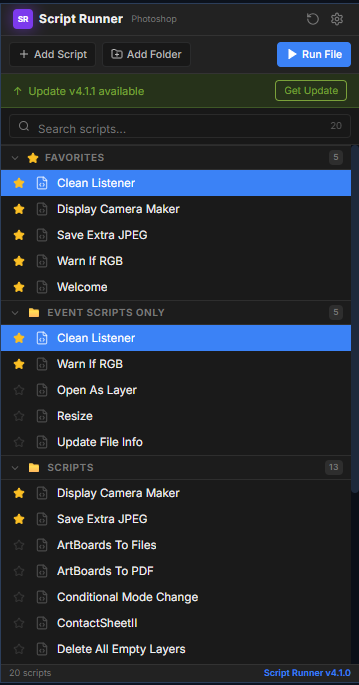
Type a keyword and find the right script in seconds — even with hundreds of scripts indexed. Use arrow keys to navigate and press Enter to run.
Star the scripts you use every day and they stay pinned at the top. One click to run your most-used actions.
Add local, network, or cloud-synced folders like Dropbox and Google Drive. Subfolders index automatically.
Right-click any script to run it, open it in your code editor, reveal the file, or hide it from the list.
Switch from list view to clickable buttons with 8 layout modes. Color-code scripts and pick a style that fits your workflow.
Arrow keys to navigate, Enter to run, Escape to clear. Keep your hands on the keyboard and your eyes on the canvas.
Detects your Adobe app's theme (Darkest, Medium Dark, Medium Light, Lightest) and adapts automatically.
Try the Panel Interface
A working replica of the Script Runner panel. Type to filter, use Up / Down + Enter, star favorites — settings persist.
How Each Feature Works
A closer look at what Script Runner does inside each Adobe app.
Type partial script names or folder fragments. Matching scripts filter in real-time with 150ms debounce.
Click the star icon next to any script to pin it. Favorited scripts float to the top section automatically.
Add local, team network, or cloud-synced folders (Dropbox/OneDrive) via Settings. Subfolders index automatically.
Right-click any script row to instantly Run, Edit in your code editor, Reveal in Explorer, Copy Path, or Hide.
Switch to Photoshop Actions-style buttons. 8 layout modes: Stacked, Auto, Auto Small, 2-Column, 3-Column, Compact, Masonry, and Justified. Color-code scripts via right-click.
Script Runner detects all 4 Adobe host application UI themes (Darkest, Medium Dark, Medium Light, Lightest) and adapts automatically.
Real Workflows, Real Time Saved
Find any script in 2 seconds instead of 2 minutes digging through menus.
“I used to dig through nested folders every time I needed a script. Now I hit a hotkey, type two letters, and it runs. It paid for itself on day one.”
Motion Designer
After Effects · Premiere Pro
“Button Mode turned my 40 most-used Photoshop actions into a single clickable panel. My retouching workflow is noticeably faster.”
Retoucher
Photoshop
“We sync our studio scripts through Dropbox and everyone on the team sees the same panel. Setup took five minutes per machine.”
Studio Lead
Photoshop · Illustrator · InDesign
$10. One purchase. No subscriptions.
No recurring monthly subscriptions. Buy once and keep Script Runner forever. Find any script in 2 seconds instead of 2 minutes digging through menus.
One-time payment • No subscription fees
Frequently Asked Questions
Up and Running in 4 Steps
Download a ZXP installer, drop in the file, open the panel, and enter your key.
Use Anastasiy Extension Manager (free) or any other ZXP installer:
Drop your ScriptRunner.zxp into the installer. Done in seconds.
In your Adobe app, go to:
Paste the key from your purchase email. You are up and running.
Script Runner is supported on Apple Silicon — your Adobe app must run under Rosetta 2.
On Apple Silicon Macs, Script Runner requires your Adobe host application to run under Rosetta 2. If Rosetta 2 is not installed, run this in Terminal:
In Finder, right-click your Adobe app (e.g., Photoshop) → Get Info, then tick "Open using Rosetta" and relaunch the app. Some Adobe apps enable this automatically on first launch.
On macOS 13+ (Ventura) or later, if the ZXP installer is blocked, go to System Settings → Privacy & Security and click Open Anyway, then enter your Mac password.